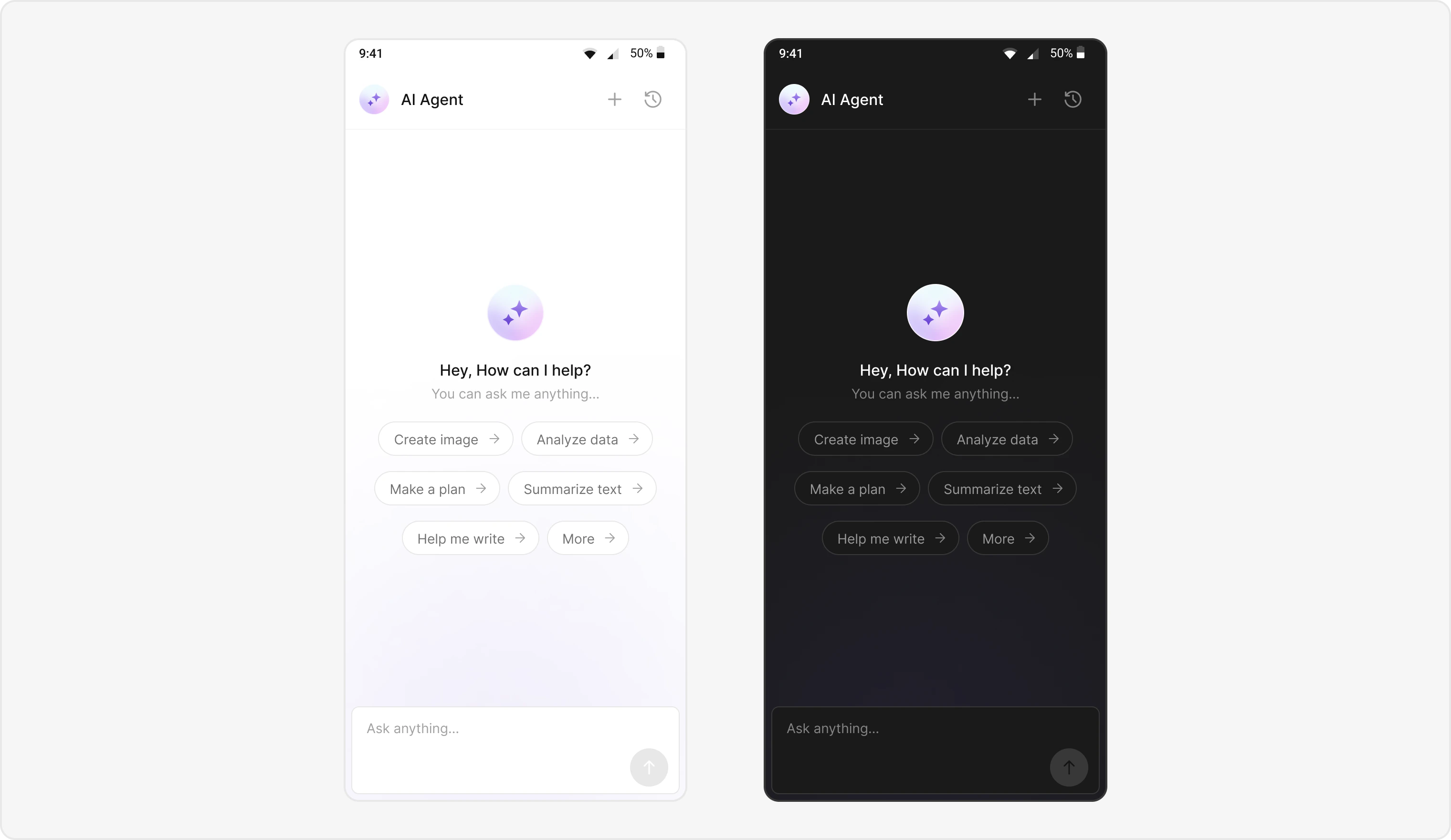
import 'package:flutter/material.dart';
import 'package:cometchat_chat_uikit/cometchat_chat_uikit.dart';
import 'package:cometchat_chat_uikit/cometchat_chat_uikit.dart' as cc;

class AIAssistantChatScreen extends StatefulWidget {
  final User? user;
  final Group? group;
  final BaseMessage? parentMessage;
  final bool? isHistory;

  const AIAssistantChatScreen(
      {Key? key, this.user, this.group, this.parentMessage, this.isHistory})
      : super(key: key);

  @override
  State<AIAssistantChatScreen> createState() => _AIAssistantChatScreenState();
}

class _AIAssistantChatScreenState extends State<AIAssistantChatScreen> {
  late CometChatColorPalette colorPalette;
  late CometChatTypography typography;
  late CometChatSpacing spacing;

  @override
  void initState() {
    super.initState();
  }

  @override
  void didChangeDependencies() {
    super.didChangeDependencies();
    typography = CometChatThemeHelper.getTypography(context);
    colorPalette = CometChatThemeHelper.getColorPalette(context);
    spacing = CometChatThemeHelper.getSpacing(context);
  }

  bool isUserAgentic() {
    return widget.user?.role == AIConstants.aiRole;
  }

  @override
  Widget build(BuildContext context) {
    final ccColor = CometChatThemeHelper.getColorPalette(context);
    return Scaffold(
      backgroundColor: ccColor.background1,
      appBar: CometChatMessageHeader(
        user: widget.user,
        group: widget.group,
        messageHeaderStyle: CometChatMessageHeaderStyle(
          backgroundColor:
              (isUserAgentic()) ? ccColor.background1 : null,
          border: (isUserAgentic())
              ? Border(
                  bottom: BorderSide(
                    color: ccColor.borderLight ?? Colors.transparent,
                    width: 1.0,
                  ),
                )
              : null,
          statusIndicatorStyle: CometChatStatusIndicatorStyle(
            backgroundColor: colorPalette.transparent,
            borderRadius: BorderRadius.zero,
            border: Border.all(
              width: 0,
              color: colorPalette.transparent ?? Colors.transparent,
            ),
          ),
        ),
        onBack: () {
          FocusManager.instance.primaryFocus?.unfocus();
          Navigator.of(context).pop();
        },
        chatHistoryButtonClick: () {
          Navigator.push(
            context,
            MaterialPageRoute(
              builder: (context) => CometChatAIAssistantChatHistory(
                user: widget.user,
                group: widget.group,
                onNewChatButtonClicked: () {
                  onNewChatClicked(true);
                },
                onMessageClicked: (message) {
                  if (message != null) {
                    Navigator.of(context)
                      ..pop()
                      ..pop();
                    Navigator.push(
                      context,
                      MaterialPageRoute(
                        builder: (context) => AIAssistantChatScreen(
                          user: widget.user,
                          group: widget.group,
                          parentMessage: message,
                          isHistory: true,
                        ),
                      ),
                    );
                  }
                },
                onClose: () {
                  Navigator.of(context).pop();
                },
              ),
            ),
          );
        },
        newChatButtonClick: () {
          onNewChatClicked(false);
        },
      ),
      resizeToAvoidBottomInset: true,
      body: Container(
        color: ccColor.background3,
        child: Column(
          children: [
            Expanded(
              child: GestureDetector(
                onTap: () => FocusScope.of(context).unfocus(),
                child: getMessageList(
                  user: widget.user,
                  group: widget.group,
                  context: context,
                  parentMessage: widget.parentMessage,
                ),
              ),
            ),
            getComposer(),
          ],
        ),
      ),
    );
    ;
  }

  Widget getComposer() {
    bool agentic = isUserAgentic();
    return CometChatMessageComposer(
      user: widget.user,
      group: widget.group,
      disableMentions: (agentic) ? true : false,
      placeholderText:
          (agentic) ? "${cc.Translations.of(context).askAnything}..." : null,
      parentMessageId: widget.parentMessage?.id ?? 0,
      messageComposerStyle: CometChatMessageComposerStyle(
        dividerColor: agentic ? Colors.transparent : null,
        dividerHeight: agentic ? 0 : null,
        backgroundColor: agentic ? colorPalette.background1 : null,
      ),
    );
  }

  onNewChatClicked(bool isHistory) async {
    if (isHistory) {
      Navigator.of(context).pop();
    }

    Navigator.pushReplacement(
      context,
      MaterialPageRoute(
        builder: (context) => AIAssistantChatScreen(
          user: widget.user,
          group: widget.group,
        ),
      ),
    );
  }

  Widget getMessageList({
    User? user,
    Group? group,
    context,
    BaseMessage? parentMessage,
  }) {
    MessagesRequestBuilder? requestBuilder = MessagesRequestBuilder();

    if (widget.isHistory != null &&
        widget.isHistory == true &&
        parentMessage != null &&
        isUserAgentic()) {
      requestBuilder = MessagesRequestBuilder()
        ..parentMessageId = parentMessage.id
        ..withParent = true
        ..hideReplies = true;
    }

    return CometChatMessageList(
      user: user,
      group: group,
      hideReplyInThreadOption: (isUserAgentic()) ? true : false,
      hideThreadView: true,
      messagesRequestBuilder: requestBuilder,
      style: CometChatMessageListStyle(
        backgroundColor: (isUserAgentic()) ? colorPalette.background3 : null,
        outgoingMessageBubbleStyle: CometChatOutgoingMessageBubbleStyle(
          textBubbleStyle: CometChatTextBubbleStyle(
            backgroundColor:
                (isUserAgentic()) ? colorPalette.background4 : null,
            textColor: (isUserAgentic()) ? colorPalette.textPrimary : null,
            messageBubbleDateStyle: CometChatDateStyle(
              textColor: (isUserAgentic()) ? colorPalette.neutral600 : null,
            ),
          ),
          messageBubbleDateStyle: CometChatDateStyle(
            textColor: (isUserAgentic()) ? colorPalette.textPrimary : null,
          ),
        ),
      ),
    );
  }
}