

Overview
CometChatAIAssistantChat is a composite component that assembles the message header, message list, and message composer to provide an AI agent chat experience. It supports streaming responses, quick starter suggestions, “New Chat” to reset context, and a chat history sidebar.
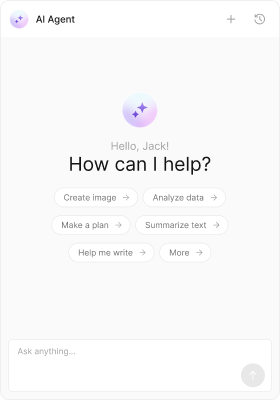
- AIAssistantChatDemo.tsx
- App.tsx
import React from "react";
import { CometChat } from "@cometchat/chat-sdk-javascript";
import { CometChatAIAssistantChat } from "@cometchat/chat-uikit-react";

export function AIAssistantChatDemo() {
    const [agent, setAgent] = React.useState<CometChat.User>();

    React.useEffect(() => {
        // Replace with your assistant UID
        CometChat.getUser("assistant_uid").then((u) => setAgent(u));
    }, []);

    if (!agent) return null;

    return(
        <>
            <CometChatAIAssistantChat user={agent} />
        </>
    );
}
import { AIAssistantChatDemo } from "./AIAssistantChatDemo";

export default function App() {
    return (
        <div className="App">
            <AIAssistantChatDemo />
        </div>
    );
}
A
CometChat.User (the AI agent) is required to start the assistant chat.Actions
Actions control how a component behaves. You can hook into the following callbacks:1. onBackButtonClicked
Called when the header back button is clicked (visible whenshowBackButton is true).
- TypeScript
- JavaScript
import React from "react";
import { CometChat } from "@cometchat/chat-sdk-javascript";
import { CometChatAIAssistantChat } from "@cometchat/chat-uikit-react";

export function AIAssistantChatDemo() {
    const [agent, setAgent] = React.useState<CometChat.User>();

    React.useEffect(() => {
        CometChat.getUser("assistant_uid").then((u) => setAgent(u));
    }, []);

    const handleBack = () => {
        // your custom action
    };

    if (!agent) return null;

    return (
        <CometChatAIAssistantChat
            user={agent}
            showBackButton={true}
            onBackButtonClicked={handleBack}
        />
    );
}
import React from "react";
import { CometChat } from "@cometchat/chat-sdk-javascript";
import { CometChatAIAssistantChat } from "@cometchat/chat-uikit-react";

export function AIAssistantChatDemo() {
    const [agent, setAgent] = React.useState(null);

    React.useEffect(() => {
        CometChat.getUser("assistant_uid").then((u) => setAgent(u));
    }, []);

    const handleBack = () => {
        // your custom action
    };

    if (!agent) return null;

    return (
        <CometChatAIAssistantChat
            user={agent}
            showBackButton={true}
            onBackButtonClicked={handleBack}
        />
    );
}
2. onCloseButtonClicked
Called when the header close button is clicked (visible whenshowCloseButton is true).
- TypeScript
- JavaScript
import React from "react";
import { CometChat } from "@cometchat/chat-sdk-javascript";
import { CometChatAIAssistantChat } from "@cometchat/chat-uikit-react";

export function AIAssistantChatDemo() {
    const [agent, setAgent] = React.useState<CometChat.User>();

    React.useEffect(() => {
        CometChat.getUser("assistant_uid").then((u) => setAgent(u));
    }, []);

    const handleClose = () => {
        // your custom action
    };

    if (!agent) return null;

    return (
        <CometChatAIAssistantChat
            user={agent}
            showCloseButton={true}
            onCloseButtonClicked={handleClose}
        />
    );
}
import React from "react";
import { CometChat } from "@cometchat/chat-sdk-javascript";
import { CometChatAIAssistantChat } from "@cometchat/chat-uikit-react";

export function AIAssistantChatDemo() {
    const [agent, setAgent] = React.useState(null);

    React.useEffect(() => {
        CometChat.getUser("assistant_uid").then((u) => setAgent(u));
    }, []);

    const handleClose = () => {
        // your custom action
    };

    if (!agent) return null;

    return (
        <CometChatAIAssistantChat
            user={agent}
            showCloseButton={true}
            onCloseButtonClicked={handleClose}
        />
    );
}
3. onSendButtonClick
Called when the composer send button is clicked.- TypeScript
- JavaScript
import React from "react";
import { CometChat } from "@cometchat/chat-sdk-javascript";
import { CometChatAIAssistantChat } from "@cometchat/chat-uikit-react";

export function AIAssistantChatDemo() {
    const [agent, setAgent] = React.useState<CometChat.User>();

    React.useEffect(() => {
        CometChat.getUser("assistant_uid").then((u) => setAgent(u));
    }, []);

    const handleSendButton = () => {
        // your custom action
    };

    if (!agent) return null;

    return (
        <CometChatAIAssistantChat
            user={agent}
            onSendButtonClick={handleSendButton}
        />
    );
}
import React from "react";
import { CometChat } from "@cometchat/chat-sdk-javascript";
import { CometChatAIAssistantChat } from "@cometchat/chat-uikit-react";

export function AIAssistantChatDemo() {
    const [agent, setAgent] = React.useState(null);

    React.useEffect(() => {
        CometChat.getUser("assistant_uid").then((u) => setAgent(u));
    }, []);

    const handleSendButton = () => {
        // your custom action
    };

    if (!agent) return null;

    return (
        <CometChatAIAssistantChat
            user={agent}
            onSendButtonClick={handleSendButton}
        />
    );
}
4. onError
Listen to errors from the underlying header, list, or composer.- TypeScript
- JavaScript
import React from "react";
import { CometChat } from "@cometchat/chat-sdk-javascript";
import { CometChatAIAssistantChat } from "@cometchat/chat-uikit-react";
export function AIAssistantChatDemo() {
    const [agent, setAgent] = React.useState<CometChat.User>();

    React.useEffect(() => {
        CometChat.getUser("assistant_uid").then((u) => setAgent(u));
    }, []);

    const handleError = (error: CometChat.CometChatException) => {
        // your error handling
    };

    if (!agent) return null;

    return (
        <CometChatAIAssistantChat
            user={agent}
            onError={handleError}
        />
    );
}
import React from "react";
import { CometChat } from "@cometchat/chat-sdk-javascript";
import { CometChatAIAssistantChat } from "@cometchat/chat-uikit-react";
export function AIAssistantChatDemo() {
    const [agent, setAgent] = React.useState(null);

    React.useEffect(() => {
        CometChat.getUser("assistant_uid").then((u) => setAgent(u));
    }, []);

    const handleError = (error: CometChat.CometChatException) => {
        // your error handling
    };

    if (!agent) return null;

    return (
        <CometChatAIAssistantChat
            user={agent}
            onError={handleError}
        />
    )
}
Customization
To fit your app’s design requirements, you can customize the appearance of the Assistant Chat component. We provide exposed properties that allow you to modify the experience and behavior according to your specific needs.Style
You can set the css of the Assistant Chat Component to customize the styling.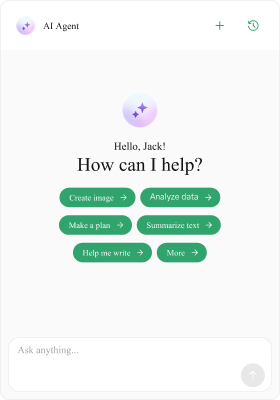
- TypeScript
- JavaScript
- css
import React from "react";
import { CometChat } from "@cometchat/chat-sdk-javascript";
import { CometChatAIAssistantChat } from "@cometchat/chat-uikit-react";

export function AIAssistantChatDemo = () => {
    const [agent, setAgent] = React.useState<CometChat.User>();

    React.useEffect(() => {
        CometChat.getUser("assistant_uid").then((u) => setAgent(u));
    }, []);

    if (!agent) return null;

    return (
        <div className="cometchat-assistant-chat__wrapper">
            <CometChatAIAssistantChat user={agent} />
        </div>
    );
}
import React from "react";
import { CometChat } from "@cometchat/chat-sdk-javascript";
import { CometChatAIAssistantChat } from "@cometchat/chat-uikit-react";

export function AIAssistantChatDemo = () => {
    const [agent, setAgent] = React.useState(null);

    React.useEffect(() => {
        CometChat.getUser("assistant_uid").then((u) => setAgent(u));
    }, []);

    if (!agent) return null;

    return (
        <div className="cometchat-assistant-chat__wrapper">
            <CometChatAIAssistantChat user={agent} />
        </div>
    );
}
.cometchat-ai-assistant-chat
  .cometchat-ai-assistant-chat__suggested-message-pill {
    background: #30a46c;
    color: #ffffff;
    text-align: center;
    font-family: "Times New Roman";
    font-size: 9px;
    font-style: normal;
    font-weight: 400;
    line-height: 120%;
}

.cometchat-ai-assistant-chat
  .cometchat-ai-assistant-chat__suggested-message-pill
  .cometchat-ai-assistant-chat__suggested-message-icon {
    background: #ffffff;
    width: 9.55px;
    height: 9.55px;
}
.cometchat-ai-assistant-chat
  .cometchat-ai-assistant-chat__header-auxiliary-view
  .cometchat-button
  .cometchat-button__icon-default {
    background: #30a46c;
}
Functionality
These props tailor the experience. Most message options (copy/edit/delete/react, receipts, date separators, etc.) are disabled by default for assistant chats.- TypeScript
- JavaScript
import React from "react";
import { CometChat } from "@cometchat/chat-sdk-javascript";
import { CometChatAIAssistantChat } from "@cometchat/chat-uikit-react";

export function AIAssistantChatDemo = () => {
    const [agent, setAgent] = React.useState<CometChat.User>();

    React.useEffect(() => {
        CometChat.getUser("assistant_uid").then((u) => setAgent(u));
    }, []);

    if (!agent) return null;

    // Example: Set streaming speed to 30 characters per second
    // and show close button
    // You can also customize suggestions, empty state, etc.
    return (
        <CometChatAIAssistantChat
            user={agent}
            showCloseButton={true}
            setStreamingSpeed={30}
        />
    )
}
import React from "react";
import { CometChat } from "@cometchat/chat-sdk-javascript";
import { CometChatAIAssistantChat } from "@cometchat/chat-uikit-react";

export function AIAssistantChatDemo = () => {
    const [agent, setAgent] = React.useState(null);

    React.useEffect(() => {
        CometChat.getUser("assistant_uid").then((u) => setAgent(u));
    }, []);

    if (!agent) return null;

    // Example: Set streaming speed to 30 characters per second
    // and show close button
    // You can also customize suggestions, empty state, etc.
    return (
        <CometChatAIAssistantChat
            user={agent}
            showCloseButton={true}
            setStreamingSpeed={30}
        />
    );
}
| Property | Description | Example |
|---|---|---|
user | Required CometChat.User representing the AI agent. | user={agent} |
streamingSpeed | Characters-per-second speed for streaming replies. Default 30. | streamingSpeed={50} |
suggestedMessages | Array of quick prompts for the empty state. | suggestedMessages=["Help", "Summarize"] |
hideSuggestedMessages | Hide the suggestions section. | hideSuggestedMessages={true} |
hideNewChat | Hide the New Chat button in header. | hideNewChat={true} |
hideChatHistory | Hide the History button/sidebar. | hideChatHistory={true} |
showBackButton | Show back button in header. | showBackButton |
showCloseButton | Show close button in header. | showCloseButton |
onBackButtonClicked | Back button handler. | onBackButtonClicked={() => {}} |
onCloseButtonClicked | Close button handler. | onCloseButtonClicked={() => {}} |
onSendButtonClick | Send button handler. | onSendButtonClick={() => {}} |
onError | Error handler. | onError={handleError} |
emptyView | Custom empty state for the list. | emptyView={<Empty/>} |
loadingView | Custom loading view. | loadingView={<Loading/>} |
errorView | Custom error view. | errorView={<Error/>} |
emptyChatGreetingView | Custom empty title (default uses metadata.greetingMessage or user name). | emptyChatGreetingView={<h3/>} |
emptyChatIntroMessageView | Custom empty subtitle (default uses metadata.introductoryMessage). | emptyChatIntroMessageView={<p/>} |
emptyChatImageView | Custom empty image. | emptyChatImageView={<img/>} |
aiAssistantTools | Provide tool/function handlers for the assistant. | aiAssistantTools={tools} |
Advanced
Header Views
Customize header sections using the following props:headerItemView, headerTitleView, headerSubtitleView, headerLeadingView, headerTrailingView, and headerAuxiliaryButtonView. These customizations are done in the similar way as the Message Header component.
The header’s “New Chat” and “History” buttons are built-in. You can override them by providing a custom
headerAuxiliaryButtonView.Assistant Tools
Pass an instance ofCometChatAIAssistantTools to enable tool/function calls during assistant replies.
- TypeScript
- JavaScript
import React from "react";
import { CometChat } from "@cometchat/chat-sdk-javascript";
import { CometChatAIAssistantChat } from "@cometchat/chat-uikit-react";
import { CometChatAIAssistantTools } from "@cometchat/chat-uikit-react";

export function AIAssistantChatDemo = () => {
    const [agent, setAgent] = React.useState<CometChat.User>();

    React.useEffect(() => {
        CometChat.getUser("assistant_uid").then((u) => setAgent(u));
    }, []);

    const tools = new CometChatAIAssistantTools({
        getCurrentWeather: ({ location }: { location: string }) => {
            // call your backend or a public API
            console.log("Fetching weather for", location);
        },
        createTicket: ({ title }: { title: string }) => {
            // open your internal ticketing flow
            console.log("Create ticket:", title);
        },
    });

    if (!agent) return null;

    return (
        <CometChatAIAssistantChat user={agent} aiAssistantTools={tools} />
    );
import React from "react";
import { CometChat } from "@cometchat/chat-sdk-javascript";
import { CometChatAIAssistantChat } from "@cometchat/chat-uikit-react";
import { CometChatAIAssistantTools } from "@cometchat/chat-uikit-react";

export function AIAssistantChatDemo = () => {
    const [agent, setAgent] = React.useState(null);

    React.useEffect(() => {
        CometChat.getUser("assistant_uid").then((u) => setAgent(u));
    }, []);

    const tools = new CometChatAIAssistantTools({
        getCurrentWeather: ({ location }: { location: string }) => {
            // call your backend or a public API
            console.log("Fetching weather for", location);
        },
        createTicket: ({ title }: { title: string }) => {
            // open your internal ticketing flow
            console.log("Create ticket:", title);
        },
    });

    if (!agent) return null;

    return (
        <CometChatAIAssistantChat user={agent} aiAssistantTools={tools} />
    );
}
Empty Chat Image View
Provide a custom image for the empty state usingemptyChatImageView.
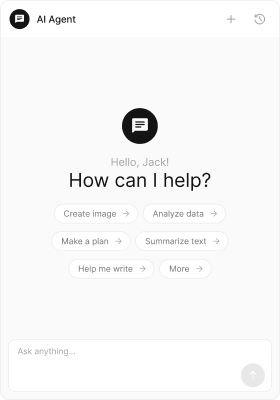
- TypeScript
- JavaScript
import React from "react";
import { CometChat } from "@cometchat/chat-sdk-javascript";
import { CometChatAIAssistantChat } from "@cometchat/chat-uikit-react";

export function AIAssistantChatDemo() {
    const [agent, setAgent] = React.useState<CometChat.User>();

    React.useEffect(() => {
        CometChat.getUser("assistant_uid").then((u) => setAgent(u));
    }, []);

    if (!agent) return null;

    return (
        <CometChatAIAssistantChat
            user={agent}
            emptyChatImageView={<img src={"ICON_URL"} height={60} width={60} />}
        />
    );
}
import React from "react";
import { CometChat } from "@cometchat/chat-sdk-javascript";
import { CometChatAIAssistantChat } from "@cometchat/chat-uikit-react";

export function AIAssistantChatDemo() {
    const [agent, setAgent] = React.useState(null);

    React.useEffect(() => {
        CometChat.getUser("assistant_uid").then((u) => setAgent(u));
    }, []);

    if (!agent) return null;

    return (
        <CometChatAIAssistantChat
            user={agent}
            emptyChatImageView={<img src={"ICON_URL"} height={60} width={60} />}
        />
    )
}
Empty Chat Greeting View
Override the empty state greeting message view using theemptyChatGreetingView prop.
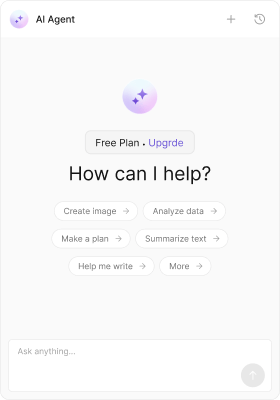
- TypeScript
- JavaScript
- css
import React from "react";
import { CometChat } from "@cometchat/chat-sdk-javascript";
import { CometChatAIAssistantChat } from "@cometchat/chat-uikit-react";

export function AIAssistantChatDemo() {
    const [agent, setAgent] = React.useState<CometChat.User>();

    React.useEffect(() => {
        CometChat.getUser("assistant_uid").then((u) => setAgent(u));
    }, []);

    if (!agent) return null;

    return (
        <CometChatAIAssistantChat
            user={agent}
            emptyChatGreetingView={
                <div className="cometchat-ai-assistant-chat__empty-chat-greeting">
                    <span className="plan-name">Free Plan</span> .
                    <span className="upgrade-button">Upgrade</span>
                </div>
            }
        />
    );
}
import React from "react";
import { CometChat } from "@cometchat/chat-sdk-javascript";
import { CometChatAIAssistantChat } from "@cometchat/chat-uikit-react";

export function AIAssistantChatDemo() {
    const [agent, setAgent] = React.useState(null);

    React.useEffect(() => {
        CometChat.getUser("assistant_uid").then((u) => setAgent(u));
    }, []);

    if (!agent) return null;

    return (
        <CometChatAIAssistantChat
            user={agent}
            emptyChatGreetingView={
                <div className="cometchat-ai-assistant-chat__empty-chat-greeting">
                    <span className="plan-name">Free Plan</span> .
                    <span className="upgrade-button">Upgrade</span>
                </div>
            }
        />
    )
}
.cometchat-ai-assistant-chat__empty-chat-greeting {
    display: flex;
    padding: 8px 20px;
    justify-content: center;
    align-items: center;
    gap: 8px;
    flex: 1 0 0;
    align-self: stretch;
    border-radius: 6px;
    border: 1px solid #e8e8e8;
    background: #f5f5f5;
    width: fit-content;
    align-self: center;
}

.cometchat-ai-assistant-chat__empty-chat-greeting .upgrade-button {
  color: #6852d6;
}
Empty Chat Intro Message View
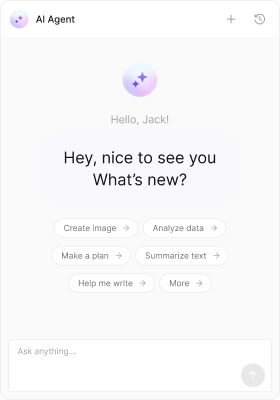
You can override the empty chat intro message view using theemptyChatIntroMessageView prop.
- TypeScript
- JavaScript
- css
import React from "react";
import { CometChat } from "@cometchat/chat-sdk-javascript";
import { CometChatAIAssistantChat } from "@cometchat/chat-uikit-react";

export function AIAssistantChatDemo() {
    const [agent, setAgent] = React.useState<CometChat.User>();

    React.useEffect(() => {
        CometChat.getUser("assistant_uid").then((u) => setAgent(u));
    }, []);

    if (!agent) return null;

    return (
        <CometChatAIAssistantChat
            user={agent}
            emptyChatIntroMessageView={
                <div className="cometchat-ai-assistant-chat__empty-chat-intro">
                    Hey, nice to see you What’s new?
                </div>
            }
        />
    );
}
import React from "react";
import { CometChat } from "@cometchat/chat-sdk-javascript";
import { CometChatAIAssistantChat } from "@cometchat/chat-uikit-react";

export function AIAssistantChatDemo() {
    const [agent, setAgent] = React.useState(null);

    React.useEffect(() => {
        CometChat.getUser("assistant_uid").then((u) => setAgent(u));
    }, []);

    if (!agent) return null;

    return (
        <CometChatAIAssistantChat
            user={agent}
            emptyChatIntroMessageView={
                <div className="cometchat-ai-assistant-chat__empty-chat-intro">
                    Hey, nice to see you What’s new?
                </div>
            }
        />
    );
}
.cometchat-ai-assistant-chat__empty-chat-intro {
    display: flex;
    padding: 12px;
    justify-content: center;
    align-items: center;
    gap: 10px;
    border-radius: 12px;
    background: #f9f8fd;
    width: 172px;
    color: #141414;
    text-align: center;
    font-family: Inter;
    font-size: 16px;
    font-style: normal;
    font-weight: 400;
    line-height: 140%;
    margin: 10px 0;
}
Templates
CometChatMessageTemplate is a pre-defined structure for creating message views that can be used as a starting point or blueprint for creating message views often known as message bubbles. For more information, you can refer to CometChatMessageTemplate. You can set message Templates to AIAssistantChat by using the following code snippet.- TypeScript
- JavaScript
import React from "react";
import { CometChat } from "@cometchat/chat-sdk-javascript";
import {
  CometChatAIAssistantChat,
  ChatConfigurator
} from "@cometchat/chat-uikit-react";

export function AIAssistantChatDemo() {
  const [chatUser, setChatUser] = React.useState<CometChat.User>();
  React.useEffect(() => {
    CometChat.getUser("uid").then((user) => {
      setChatUser(user);
    });
  }, []);

  const getTemplates = () => {
    let templates = ChatConfigurator.getDataSource().getAllMessageTemplates();
    templates.map((data) => {
      data.footerView = (message) => {}; //custom view here
    });
    return templates;
  };

  return chatUser ? (
    <div>
      <CometChatAIAssistantChat user={chatUser} templates={getTemplates()} />
    </div>
  ) : null;
}
import React from "react";
import { CometChat } from "@cometchat/chat-sdk-javascript";
import {
  CometChatAIAssistantChat,
  ChatConfigurator
} from "@cometchat/chat-uikit-react";

export function AIAssistantChatDemo() {
  const [chatUser, setChatUser] = React.useState(null);

  React.useEffect(() => {
    CometChat.getUser("uid").then((user) => {
      setChatUser(user);
    });
  }, []);

  const getTemplates = () => {
    let templates = ChatConfigurator.getDataSource().getAllMessageTemplates();
    templates.map((data) => {
      data.footerView = (message) => {}; //custom view here
    });
    return templates;
  };

  return chatUser ? (
    <div>
      <CometChatAIAssistantChat user={chatUser} templates={getTemplates()} />
    </div>
  ) : null;
}