

User Interface Preview
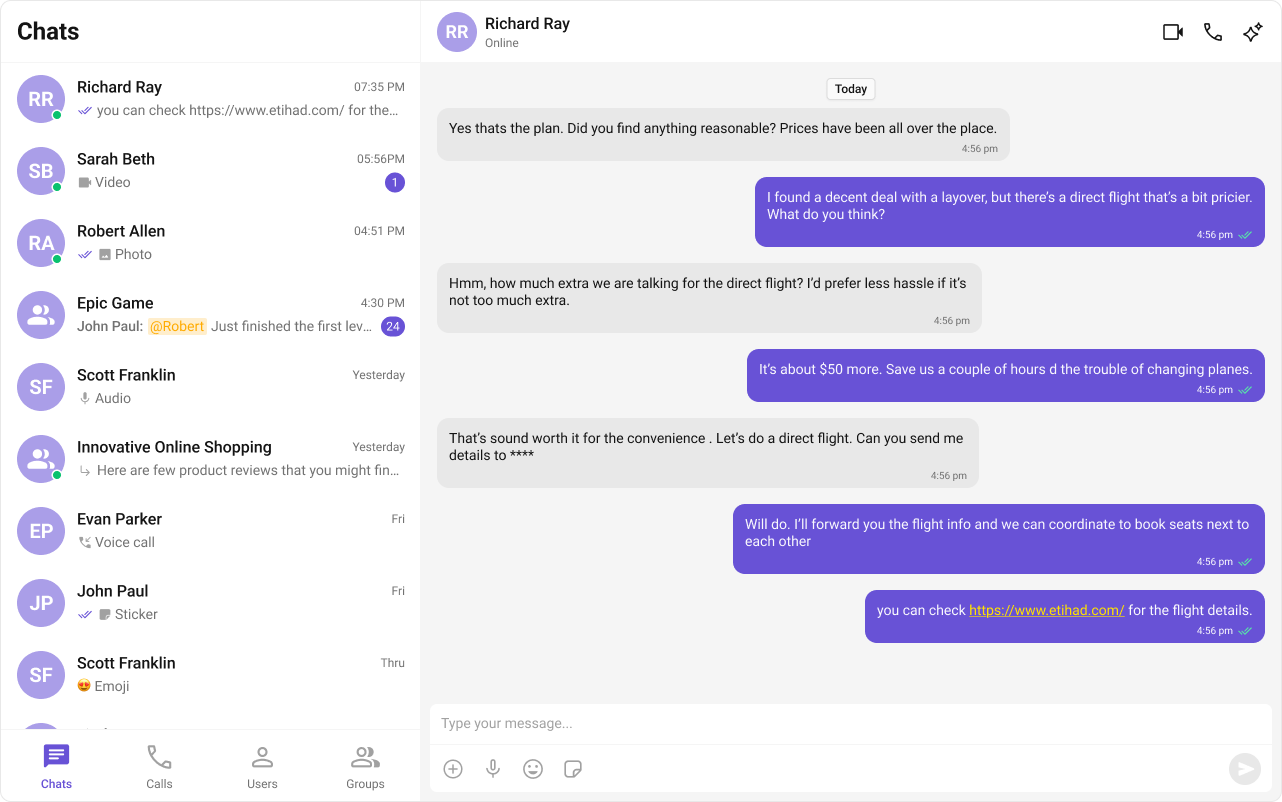
- Sidebar – conversations, users, groups, or call logs
- Messages – header, list, and composer
- Tabs – switch between Chats, Calls, Users, and Groups
Prerequisites
- Astro project with React integration
- CometChat credentials in
.env
1
Create or open an Astro project
If you already have the sample
astro-tab-based-chat project, open it instead.2
Add React and install CometChat UI Kit
.env:3
Initialize CometChat (src/lib/cometchat-init.js)
Create
src/lib/cometchat-init.js to initialize the UI Kit and provide a helper for login.src/lib/cometchat-init.js
4
Create the Tabs component (src/components/CometChatTabs.jsx)
A simple bottom tab bar used to switch between sections.
src/components/CometChatTabs.jsx
5
Build the React island (src/components/TabbedChat.jsx)
This component renders the sidebar list based on the active tab and shows the message panel on the right.
src/components/TabbedChat.jsx
6
Render the page (src/pages/index.astro)
Import the island and styles, then hydrate on the client.
src/pages/index.astro
7
Run and verify
Log in using
PUBLIC_COMETCHAT_LOGIN_UID, switch tabs, and open a conversation to send messages.Troubleshooting
Tabs not switching or empty lists
Tabs not switching or empty lists
Ensure
CometChatTabs is wired via onTabClicked and that the active tab state drives which list is rendered.Missing credentials
Missing credentials
Verify
.env contains PUBLIC_COMETCHAT_APP_ID, PUBLIC_COMETCHAT_REGION, PUBLIC_COMETCHAT_AUTH_KEY, and PUBLIC_COMETCHAT_LOGIN_UID.No messages on right panel
No messages on right panel
The message panel shows only for Chats, Users, or Groups. Calls tab does not open a message panel.
Next Steps
- Add call handling with CometChat Calls SDK
- Apply theming and component overrides
- Extend with unread badges and notifications